 OctoPrint.org
New release candidate: 2.0.0rc1
It makes me extremely happy (and to be honest also quite anxious) to hereby present to you the very first release candidate of the upcoming 2.0.0 release! 🥳
As mentioned in a recent post, this release packs a sheer ton of changes under the surface, finally enabling support for other printer interfances than a serial connection through plugins. This is a goal I have been trying to achieve since 2015 now, and with the latest implementation approach that I started back in November 2024, I finally succeeded!
As the changes required to do this were massive, and the one or other backwards compatibility issue surely crept in, I decided to go all in with this release, finally increase the major version to “2” and also do a long necessary clean up of bits and pieces that had been deprecated for the better part of a the past decade now.
Given the amount of internal changes, I should also be adding an extra word of warning here: More than usual, consider that this is a release candidate, NOT a stable release, and there might still be bugs in here that will break your usual workflows. You really should feel comfortable with possibly having to do a downgrade to an earlier version, potentially even manually via the command line. Also remember that you can always access a recovery page at /recovery/ that allows you to restart OctoPrint in safe mode, should a misbehaving plugin render your UI unusable.
With that being said, let’s take a look at the changes. Unsurprisingly, the changelog is too long to include here in full, but I still want to give some more details on some personal highlights here:
-
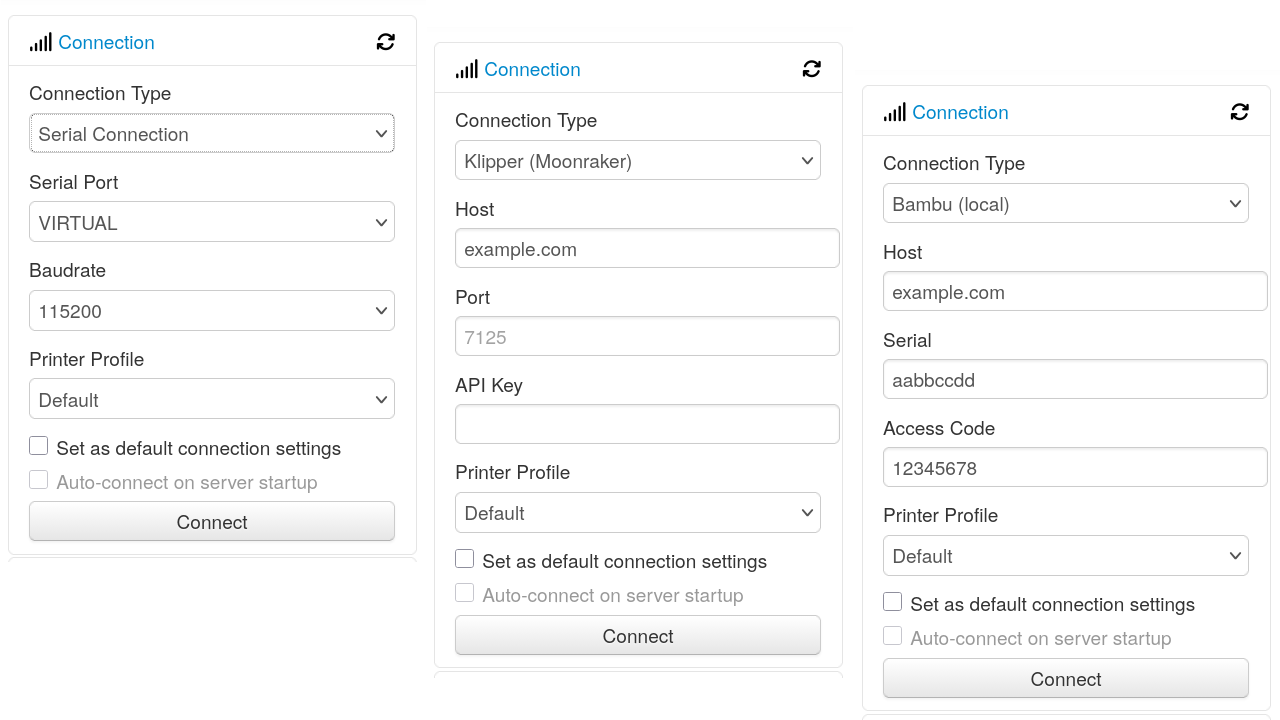
As already mentioned, OctoPrint 2.0.0 completely revamps the printer communication layer: Connecting to and communicating with a printer is now done through a connector, and connectors can be added by plugins! What used to be old comm layer has now been migrated into the bundled Serial Connector Plugin that supports connecting to printers through a serial connection. And there are already two alternative connectors in the works to open up OctoPrint to other printer ecosystems: the Moonraker Connector Plugin allows connecting to printers that get shipped with Klipper/Moonraker on board, and the Bambu Connector Plugin supports connecting to the (local!) API of printers from Bambu Lab.
The connection dialog will offer you to select the connector to use, and then allow you to enter (and save!) the necessary connection parameters. OctoPrint then talks to your selected connector to connect to your printer, fetch data from it, send jobs to it and in general control it.
Through connector plugins, everyone can now add support for new (and possibly even proprietary & reverse engineered) printer interfaces and thus take back control from vendors who’d prefer to keep you locked into their own ecosystems.
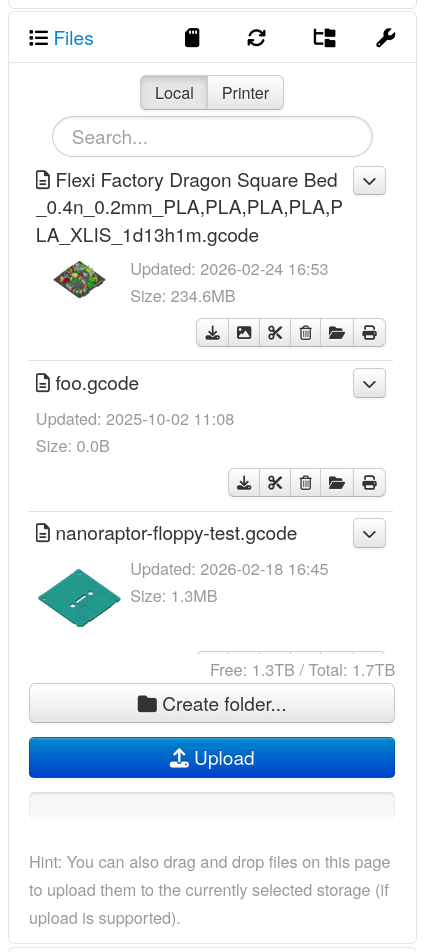
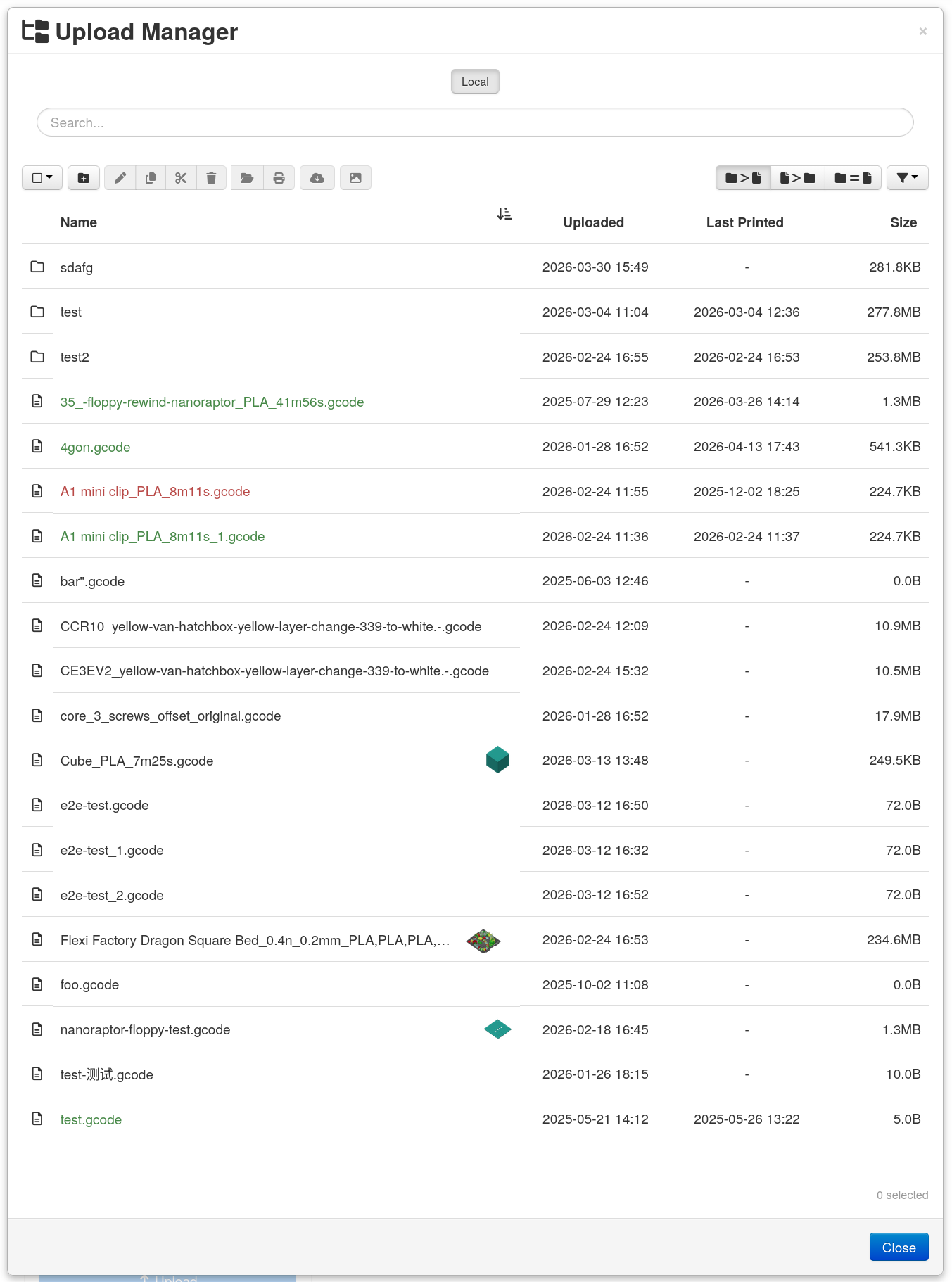
- Together with the changes needed to make connectors possible, printer side storage has been turned into a full blown native storage in OctoPrint’s internal file manager, and further storages can also be added through plugins. Together with multi storage support added to the file manager panel and the bundled Upload Manager Plugin, and support for cross storage transfer of files and folders, this makes for new possibilities on how to manage your printables. And the storage support built into the printer connector concept also makes sure all of this works natively with whatever printer connector you use, as long as it has implemented the necessary access methods.
- Native thumbnail support was also added. A stand-alone gcode-thumbnail-tool has been developed that is now used internally to perform thumbnail extraction on the
localstorage. And the printer connector interface defines methods that if implemented also support fetching & displaying the thumbnails from files stored inside the printer’s storage. The file manager panel and the bundled Upload Manager Plugin have both been adjusted to display any available thumbnails. - To give printers (and slicers) more control over print time estimation (it’s likely they know best how long something will take!), estimations will now also be fetched from the printer connector, if it supports them. In the case of the bundled Serial Connector Plugin,
M73commands contained in the printed GCODE file will now be used to provide print time estimation basically right from your slicer. - As there have been plenty of changes to support the new printer connectors, the first class printer storage, and some other things, OctoPrint now supports API versioning on its HTTP APIs. Clients can specify the API version they require with a custom
X-OctoPrint-Api-Versionheader, specifying the OctoPrint version from which they expect the API behaviour and data model, and OctoPrint will match that accordingly. See also the newly added documentation on API versioning. - An (optional) configuration setting of trusted authentication proxies has been added. If trusted authentication proxies (address or range, like trusted reverse proxies) are configured, the chain of trusted involved reverse proxies will be checked for any of the authentication proxies. Only if an authentication proxy was involved in the request will the remote user header then be evaluated. This is an additional security measure.
- OctoPrint now supports Python 3.14 (and requires at least Python 3.9).
- Several bugs have been fixed, in server, frontend and the documentation.
- … and more!
Please also take a look at the following heads-ups:
Heads-up: OctoPrint 2.0.0 requires Python 3.9+This release of OctoPrint requires Python 3.9+. Python 3.7 & 3.8, still supported by OctoPrint 1.11.x, are no longer supported. Please also see this FAQ entry on OctoPrint’s Python version requirements.
Heads-up: A new setting is available to configure trusted authentication proxiesSo far, if you set
accessControl.trustRemoteUsertotruein yourconfig.yaml, OctoPrint would trust any incomingX-Remote-Userheader. That could of course in theory be abused if your OctoPrint instance was reachable directly in addition through your trusted authentication proxy. In OctoPrint 2.0.0, theaccessControl.trustedRemoteUsersetting has been replaced with a list of trusted authentication proxies. This defaults to empty, but if you hadtrustedRemoteUserenabled it will get set to your list of configured trusted reverse proxies. OctoPrint will now only accept and evaluate theX-Remote-Userheader if the request it is seeing came via any of your configured trusted authentication proxies - which must also be among your trusted reverse proxies.If you are currently using the
accessControl.trustedRemoteUserfeature in OctoPrint, you will want to check whether your list of trusted reverse proxies is configured correctly & contains your trusted authentication proxy prior to upgrading. And once upgraded, you’ll want to limit the list of trusted authentication proxies further to only those of your reverse proxies that actually provide authentication.
Heads-up: Plugin authors need to check if they are still using any of the now removed deprecated featuresOctoPrint has been logging deprecations warnings for some of its APIs, classes and utility methods for years, some of which even for a decade now.
Plenty of plugins have been ignoring these deprecation warnings. With the advent of OctoPrint 2.0.0, most of those long deprecated bits and pieces have however now been removed, and those plugins that have been ignoring deprecations without changes will effectively break.
If you are a plugin author, you NEED to consult this migration guide to check and update your plugin so it continues to work against OctoPrint 2.0.0. You might want to check out this scanner tool by @jacopotediosi that allows you to scan your plugin’s source code for any deprecated usages, upcoming issues with 2.0.0 and also packaging related problems.
You can find the full changelog and release notes as usual on GitHub.
Special thanks to everyone who contributed to this release candidate and provided full, analyzable bug reports, you help making the next release as stable as possible! And of course also thank you to everyone who helped fund the development that went into this release candidate!
A special Thank You! to these 9 fine people for their PRs, and an extra warm welcome to our 7 first-time contributors! 🎉






As the past RCs have shown me that a lot of people appear to be unaware of this: Please do not install this RC if you expect a fully stable version. It is not a stable release, it is a release candidate: severe bugs may occur, and they might be bad enough that they make a manual downgrade to an earlier version necessary - maybe even from the command line.
You should feel comfortable with and capable of possibly having to do this before installing an RC.
If you want to and can help test this release candidate, you can find information on how to switch to the "Release Candidates" release channel in this guide if not already done (also linked below).
Please provide feedback on this RC. For general feedback you can use this ticket on the tracker. The information that everything works fine for you is also valuable feedback 😄. For bug reports please follow How to file a bug report - I need logs and reproduction steps to fix issues, not just the information that something doesn't work so make sure to fill out all fields of the issue template.
While testing the release candidate, please take a closer look at these things:
Proper behaviour when using the included web interface as well as any third party clients at your disposal.
Printing via serial connection.
Managing files on your printers storage via a serial connection.
If you have a Klipper/Moonraker based printer available: can you use it through OctoPrint when you install the Moonraker Connector (work in progress)?
If you have a Bambu based printer available: can you use it through OctoPrint when you install the Bambu Connector (work in progress)?
Thanks!
Depending on the feedback regarding this version I'll look into fixing any observed regressions and bugs and pushing out a follow-up version as soon as possible and necessary.
Links
- Ticket for general feedback
- Changelog and Release Notes
- FAQ entry "My OctoPrint update fails" (Read in case of any update problems!)
- How to use release channels to help test release candidate
- How to file a bug report
- Contribution Guidelines (also relevant for creating bug reports!)
- FAQ
- Documentation
- How to roll back to an earlier release (OctoPi)
- How to roll back to an earlier release (manual install)
Images


Discuss!